Table of Contents
Client card payments in CoreBookings go to your connected Stripe account. Stripe then pays those funds out to your bank on a schedule you control in Stripe—not inside CoreBookings itself.
Short answer #
- In CoreBookings, open Settings → Payments.
- Click Open Stripe Dashboard.
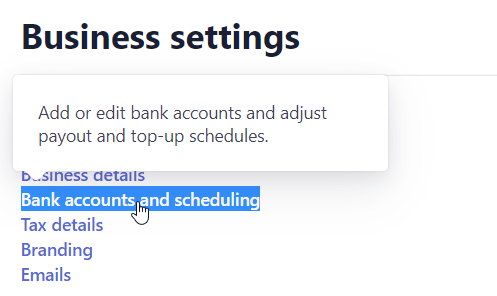
- In Stripe, go to Settings → Bank accounts and scheduling (also linked as Payout settings).
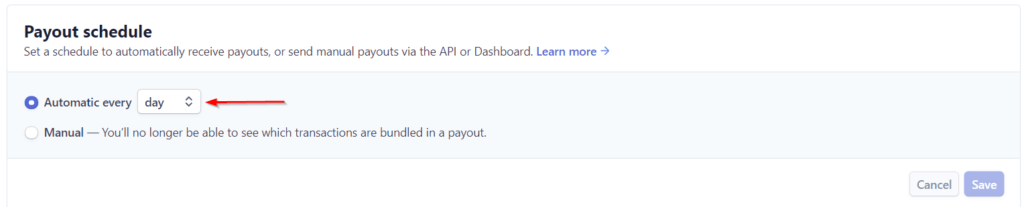
- Set Payout schedule to automatic every day (daily), then save.
Daily payouts vs Instant Payouts #
- Daily automatic payouts — Stripe sends available balance to your bank each day on your payout schedule. This is the usual way studios get paid more often than weekly or monthly.
- Instant Payouts — a separate Stripe feature (where eligible) that can move eligible funds faster, often with a fee. Availability depends on your country, account type, and Stripe eligibility. CoreBookings does not enable or disable Instant Payouts.
Most studios wanting “paid every day” only need to change the Payout schedule to daily. Instant Payouts are optional and not required for a daily schedule.
Open Stripe from CoreBookings #
Where: Settings → Payments
- Confirm Stripe shows as Connected.
- Click Open Stripe Dashboard.

If Stripe is not connected yet, connect it first under the same page. See Setting up Stripe.
Set payouts to every day #
In the Stripe Dashboard:
- Open Settings (usually at the bottom of the left menu).
- Open Bank accounts and scheduling (or go directly to dashboard.stripe.com/settings/payouts).
- Under Payout schedule, choose automatic payouts every day / daily.
- Confirm your bank account details are correct, then save any changes Stripe prompts for.
Exact labels can vary slightly by Stripe account type (full Dashboard vs Express), but the payout schedule setting lives in Stripe’s payout / bank settings.
What daily payouts do not change #
- First payout wait: a new Stripe account still has the usual first-payout delay (often about 7–14 days). Changing to daily does not remove that. See What is the waiting period for first payout on Stripe?.
- Settlement timing: funds still need to become available before they can be paid out. Daily means Stripe pays out available balance more often—not that every card charge hits your bank the same day.
- CoreBookings fees / studio plan: payout schedule is a Stripe bank setting, separate from your CoreBookings subscription billing.
For Stripe’s own timing details, see Stripe standard payout timing.