
Table of Contents
KRIYA has a feature to Pause an ongoing Plan Membership/Subscription with a Customer. It helps when the Business or the Customer finds a sudden need not to operate as planned or cannot join the session.
Steps to Find Customer(s) and Pause Their Subscription #
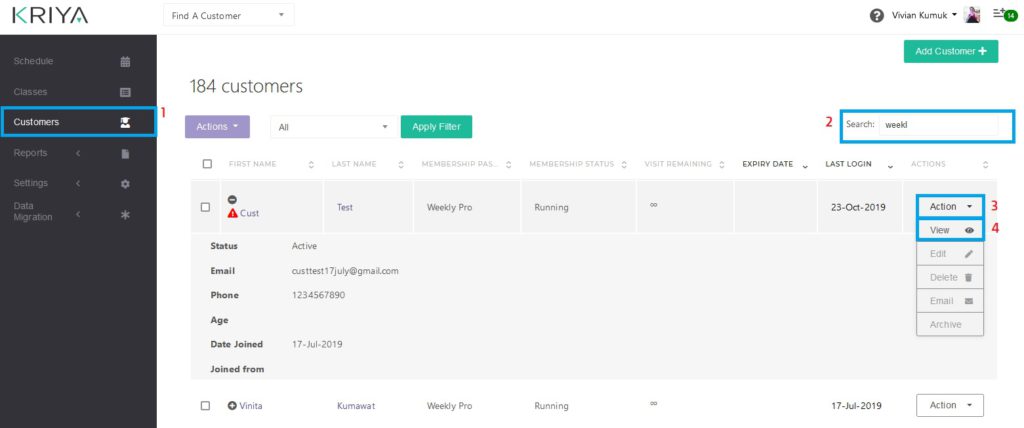
- Log in to KRIYA—and click on—Customers—on the main menu on the left.
- Find the Customer(s) in the Search box using their Names or Membership Package Name.
You can also use other terms in the list for the search, like Membership Status. Type “Running” in the Search Box to see only Customers with running Packages. - Click on the Actions button beside the Customer whose Package you want to Pause, and Click on View. This will open that particular Customer’s “Customer Details Page”.
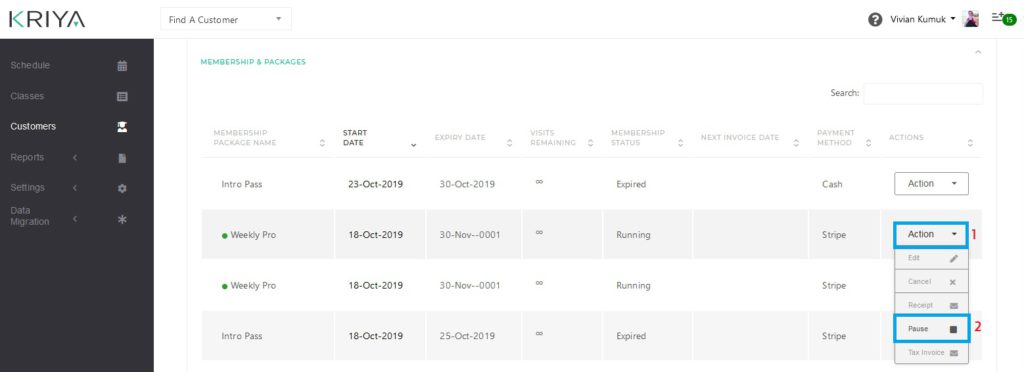
- Scroll down on that page to find the “Membership & Packages” Section. Select the Actions button beside the Package you want to pause. Now Click on—the Pause—Option in the Actions Button List.
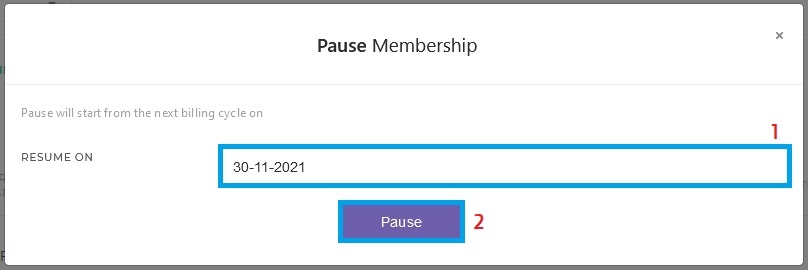
This will open a Pop-Up. - Select the Resume Date in the Resume on—Date Table from the Pop-Up, and—when the Package will run normally. Select future dates to avoid an Error Message.
- Now Click on the Pause button. This will confirm the Pause action, and the Plan will now be paused till the date provided.
See Also :
1. How Do I Set Up Recurring Payments or Membership Passes?
2. How do I Cancel a customer’s Recurring Membership Plan?
3. Do —recurring— or membership payments stop automatically after the number of days specified in the pass set-up?
4. What do we do When we get Automatic Subscription Payment Failed Emails or Stripe API Error Emails?


