
Table of Contents
We chose Stripe as your payment gateway at KRIYA.
How to connect to Stripe. #
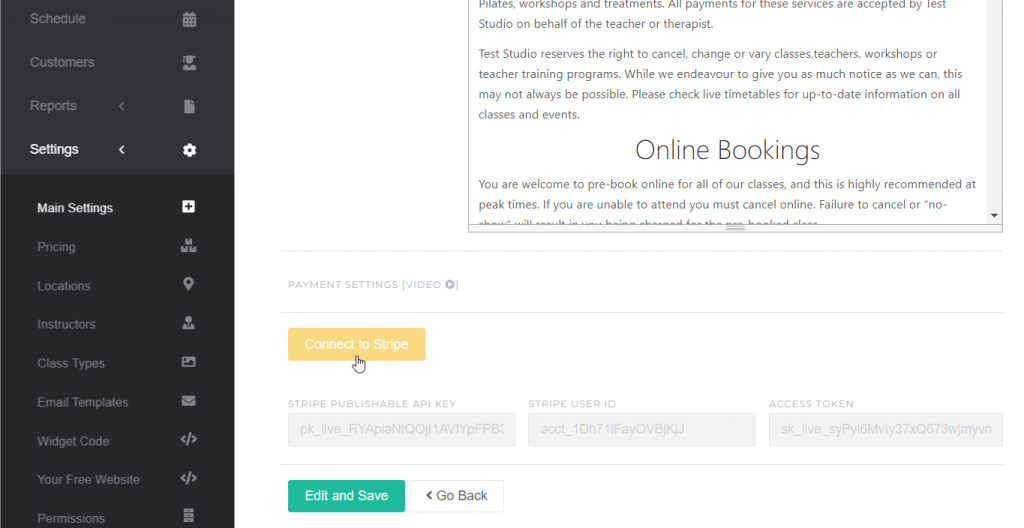
Connecting your KRIYA Account with Stripe is an easy and simple process. [Watch Video ?]
- Log into your KRIYA Account
- Go to Settings – > Main Settings, scroll down, and click the yellow button [Connect to Stripe]
- You will ask to confirm.
- Follow the steps to create a new Stripe Account or log in to your existing one.
CoreBookings transaction fees are Stripe fees + 1%. Stripe charges its own card processing fee on each payment, and CoreBookings adds a 1% platform fee.
Stripe’s rates depend on the card type and are set by Stripe (for example domestic vs international cards). You don’t pay CoreBookings anything for failed charges.
Compare processing fees with other merchants
https://docs.google.com/document/d/16S1Pw-xr97GGSo33lh6seAk3rj15KeSjKZditeGYW9E/edit?usp=sharing
If you find any difficulty in linking your Stripe account with KRIYA, please feel free to contact us.


