
Table of Contents
KRIYA provides default Email and Text Message support for the Studios to quickly convey information to their Clients / Students. Messages you want to send could be anything related to class, like instructions etc.
To send Email or a Text Message follow the Steps Below: #
- Click on Customers in left Main Menu.
- Select the Check box beside student names to whom you want to send a message.
- Find and Click on Actions button in top left, Just Above Students list.
- Now select Email or SMS, whichever way you want to communicate.
Selecting either will cause a pop-up to appear. Fill in all the details and Click on Send button.
Selecting the Email option from Actions button. #
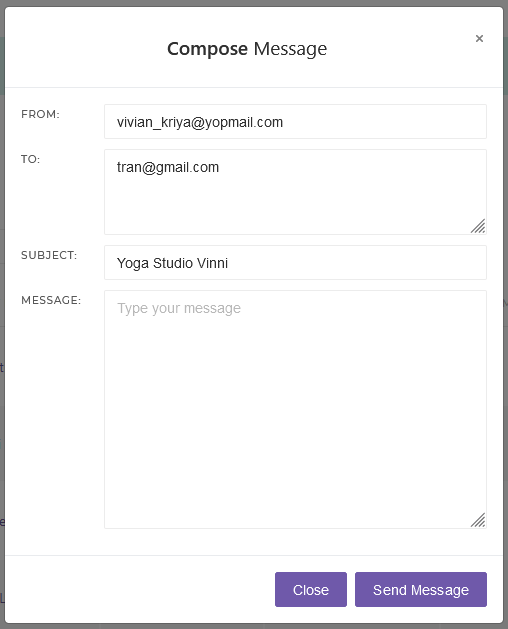
This will cause the Email pop-up to appear. Here you can change all the text boxes.
- From: Leave it as it is, as your Studio Email will already be there. Still, you can change it if in case you want to.
- To: Here Email Ids of all the students you have select will appear, you can add more student Email Ids if you want to.
- Subject: Your Studio name will auto appear here, but feel free to change it according to you.
- Message: Here you will type the message you want to send. And click on Send Message button.
Selecting the SMS option from Actions button. #
This will cause the SMS pop-up to appear. Here you can change 3 out of the 4 text boxes.
- From: This text box will be locked with your studio name so the recipient Students can know from whom they are receiving the text message, so they won’t see it as a spam or else.
- Country: Keep this as it is, as this will be auto-selected according to the Studio’s location.
- To: Here you will see the numbers of all the students you selected to send the message, add more student numbers if you need to.
- Message: Type the actual message you want to send, here. And click on Send SMS button.
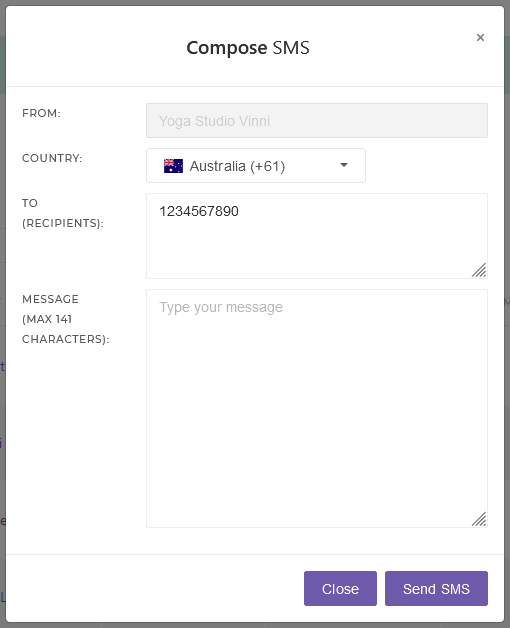
Note: The country code will be applied only if the client’s number hasn’t already included a +(country code) in the number


