
KRIYA has a Pay Later feature, which lets a customer book a visit with the business without the hassle of paying during the booking process.
It helps the Business generate Revenue and their Customer to Book a Visit, even at the last minute, if a spot is available.
See Also :
- How to Add a Student who has no Package with Pay Later, Check this Help Doc. : https://kriya.com.au/docs/if-a-student-comes-to-class-and-hasnt-paid-can-i-still-add-them-to-class/
- To find the Customers who opted for Pay Later, Check this Help Doc. : https://kriya.com.au/docs/unpaid-visits-report/
Navigation to the Customer Page for settlement #
To settle, find the customer in the Unpaid Visit Report or at the Class you want to pay for. Let us look at it one by one. Use the below two methods to find the exact customer for settlement.
Through Unpaid Visits Report #
This is helpful when settling with multiple customers simultaneously, like at the end of every month. This comes down to Business Owner preference.
- Login to KRIYA, click on Reports in the left Main Menu, then click on Unpaid Visits.
- Look for the Customer in the Report using the functions available and click on the “Click Here” Text in the Settle Column to visit that particular Customer’s Page.
Through Classes/Visits in Schedule #
Use this to find the recent Sessions and check whether you have any settlements to complete.
Example: When the customer comes to pay for a session at the end.
- Login to KRIYA, click on Schedule in the left Main Menu, this will open the schedule page.
- Choose the Session/Class and click on Open Class.
- Find the Customer Name with a “red dot” indicating unpaid customer, and click on that Customer Name to visit that particular Customer’s Page.
How to settle a Class #
Once you are on the Customer’s Details Page using the Navigation steps, scroll down and look for the—Membership & Packages—section. In it, find the Add New Membership Package Row.
Now, while settling, Customers can pay for One Session or buy a Package available at your Business. You can decide on one or more visits; select the package according to the visits you want to settle.
- Select the Package with credits equal to the Visits you want to settle in the Select Package List Box.
- Select the Payment mode in the Select Payment Method List Box, which can be cash or credit card.
- Click on Add Package to add it to the customer account.
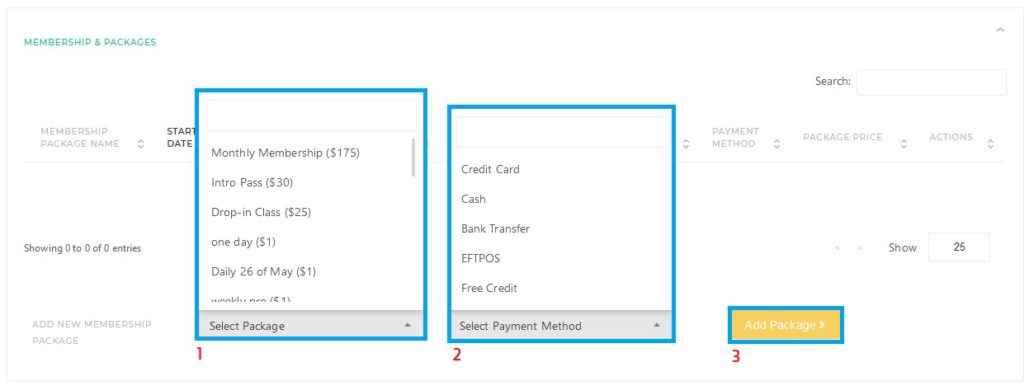
Just now we added a package to the Customer’s Account as we got the payment from the Customer, now we need to use it to settle it using the steps below.
- On the same Customer Details Page, look for the Customer History Section. In it, you will find the customer’s history, such as the date you joined, classes booked, and classes owned.
- Click on the Settle Owed Classes Button beside the Classes Owed Column, which shows the number of Classes the Customer Owes.
- A Settling owed classes Pop-Up will appear. Select the number of Classes using the Check Boxes.
- Select the Package to settle from the Select Package List.
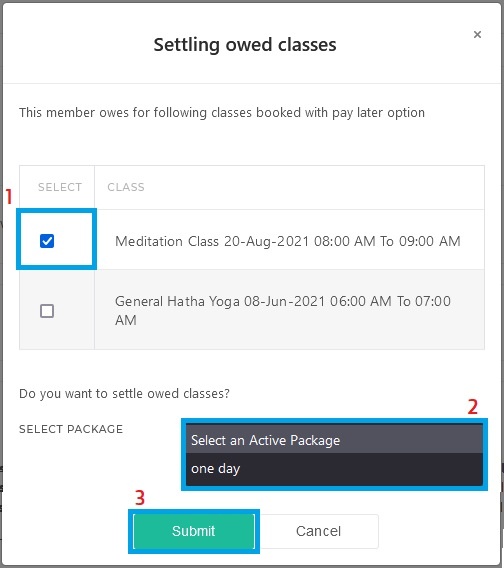
Most businesses have a single visit pass/package for a one-time session, which they use to settle a single-owed class and add that same pass multiple times to pay for multiple visits.
But You can add any Package which has multiple Visits/Credits and then use its visits for settling multiple or single owed classes, then the customer can use the remaining visits for the future bookings.
Note: Credits are the number of Sessions / Visits a Customer gets with a particular Package. So, Credits for a Single Visit can be different for different Classes. One can only Settle an Owned visit with a Package having Equal or more Credits.


